If you run an online store, you already know product photos matter. But in 2026, the brands pulling ahead aren't just using better photos, they're using video. And until recently, that was out of reach for most small businesses.
A professional product video shoot costs anywhere from $500 to $3,000. You need a videographer, lighting equipment, a location, editing software, and days of back-and-forth. For a small business owner juggling everything else, it simply isn't practical.
AI product video generators have changed this equation entirely. You can now upload a photo of your product and generate a professional, commercial-quality video in minutes, no camera, no crew, no editing experience needed. This guide explains exactly how.
In This Guide
Why Product Videos Matter for Ecommerce in 2026
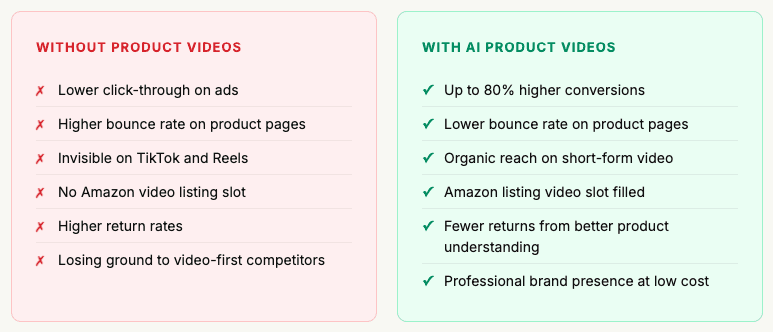
The data on product videos is hard to ignore. Shoppers who watch a product video are significantly more likely to buy and significantly less likely to return it. Video answers the questions that photos can't: How big is it really? How does it move? What does it look like in use?
Product videos can increase conversion rates by up to 80% on product pages. On social media, video content generates 12x more shares than text and image content combined.
Beyond conversion rates, video is now expected. On TikTok, Instagram Reels, YouTube Shorts, and Amazon listings, video is the default format and brands without it are increasingly invisible. Your tally data from Caspa's customers confirms this: over 13% of paying customers found Caspa via YouTube and short-form video platforms before signing up.
The 5 Types of AI Product Videos You Can Create
Not all product videos serve the same purpose. Here are the five most effective types for ecommerce brands in 2026, all of which can be created using Caspa AI:
1. Product Showcase Video
A clean, polished video showing your product from multiple angles against a professional background. The ecommerce standard, works everywhere from Amazon to your own website.
Best for: Amazon listings, product pages, Google Shopping ads
2. Lifestyle Video
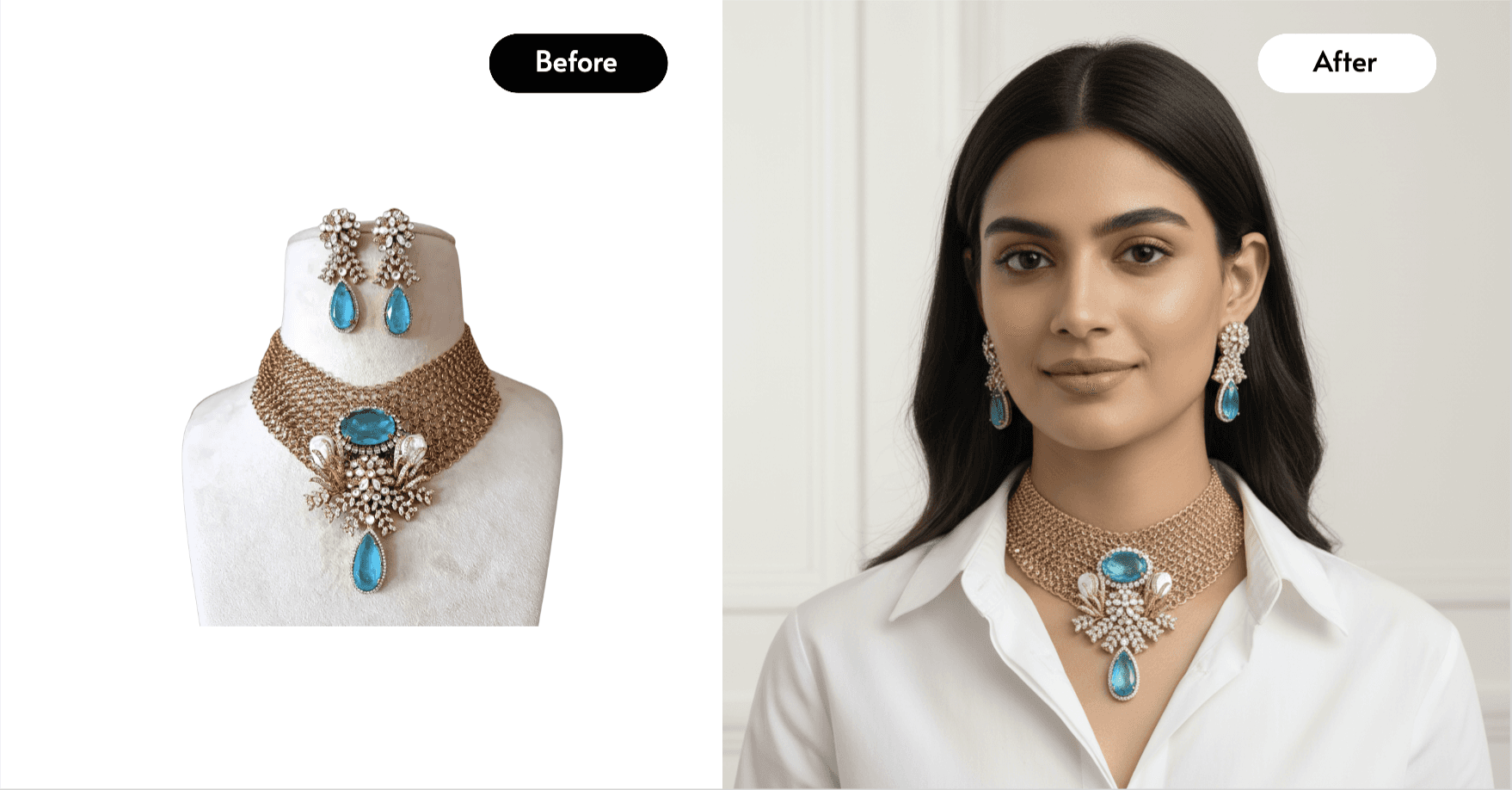
Your product shown in a real-world setting or in use by an AI human model. Shows customers what owning and using your product actually looks and feels like.
Best for: Instagram Reels, TikTok, Facebook ads, landing pages
3. Feature Highlight Video
A short video that zooms into and highlights specific product features with text callouts. Answers the "but what exactly does it do?" question before customers have to ask.
Best for: Amazon A+ content, email marketing, product demos
4. Brand Story Video
A short narrative video that places your product in context of your brand's mission and aesthetic. Builds emotional connection and brand recognition over time.
Best for: Brand awareness campaigns, homepage, social media
5. Ad Creative Video
Short, punchy videos (6–15 seconds) optimised for paid social and Google ads. Hook-driven content designed to stop the scroll and drive clicks.
Best for: TikTok ads, Meta ads, YouTube pre-roll, Google display
Where to Use Your AI Product Videos
Create Your First AI Product Video
Caspa AI generates professional product videos in minutes. Growth plan includes 8 minutes of video per month — enough for multiple ad creatives, listings, and social posts.
Start Creating with Caspa AI →
Step-by-Step: Creating Product Videos with Caspa AI
Caspa AI is one of the only platforms that combines AI product photography and AI product video in a single tool — meaning you can create your full visual library, both photos and videos, in one place. Here's exactly how to do it.
1. Upload Your Product Photo
Start with a simple, clear photo of your product - a smartphone shot in good light is enough. Caspa AI uses this as the foundation for generating your video. You don't need a video camera or any filming equipment.
💡 Tip: A clean, well-lit photo against a neutral background gives the AI the clearest starting point and produces the best video output.
2. Choose Your Video Type and Style
Select the type of video you want and then write a text prompt to get the product showcase, lifestyle, ad creative, or feature highlight you want. Then choose the visual style: clean and minimal, warm and lifestyle-focused, bold and ad-ready.
3. Set the Scene
Describe the environment or scenario you want your product in. A kitchen counter, an outdoor market, a luxury flat lay, a model wearing your clothing - Caspa AI generates a photorealistic scene around your actual product.
💡 Tip: Think about where your customer is when they use your product. Match the scene to their lifestyle and the video will resonate far more strongly.
4. Add AI Human Models (Optional)
If your product benefits from being shown on or with a person e.g. clothing, jewellery, skincare, accessories, food — Caspa can generate AI human models interacting with your product in the video. This dramatically increases engagement and conversion, especially for fashion and beauty brands.
5. Generate and Preview
Caspa generates your video in minutes. You can preview it, make adjustments to the scene, style, or motion, and regenerate until it's exactly right.
💡 Tip: Generate 2–3 variations of the same video with slightly different scenes or styles. You'll have ready-made A/B test material for your ads.
6. Download and Deploy
Download your finished video at full resolution — fully commercially licensed and ready to use. Upload directly to Amazon Seller Central, your Shopify store, Meta Ads Manager, TikTok, or any other platform. No watermarks, no restrictions.
Our team uses Caspa on a daily basis to improve our clients' image and video. The Caspa team is easy to reach when we need assistance. They've also shipped features really quickly after we've made suggestions. Would highly recommend.
— Daniel, Digital Marketing Agency
Cost Comparison: AI vs Traditional Video Production
Here's what it realistically costs to produce a professional product video the traditional way versus using Caspa AI:
What You Need | Traditional Video Production | Caspa AI |
|---|---|---|
Videographer | $300–$800/day | ✗ Not needed |
Studio / location hire | $150–$500/day | ✗ Not needed |
Models | $200–$600/day | ✓ AI models included |
Lighting equipment | $100–$300 hire | ✗ Not needed |
Video editing | $100–$500/video | ✓ Included |
Resizing for platforms | $50–$200 extra | ✓ Included |
Turnaround time | 1–2 weeks | Under 10 minutes |
New video for a new campaign | Full production cost again | Minutes, included in plan |
Commercial usage rights | Negotiated separately | ✓ Always included |
Estimated total per video | $500–$2,000+ | From $69/mo (Growth plan) |
The Growth plan includes 1,000 credits per month, equivalent to 8 minutes of video, or around 32 x 15-second ad creatives. For most small businesses, that's more than enough to cover all channels for the entire month.
Pro Tips for Higher-Converting Product Videos
1. Hook in the first 2 seconds
Whether it's TikTok, Instagram, or a Facebook ad, you have 2 seconds to stop the scroll. Start with your most visually striking shot — the product looking its best, a bold colour, or a model in action. Never start with a logo or title card.
2. Keep it short for ads, longer for listings
For paid social ads, 6–15 seconds is the sweet spot. For Amazon listings and product pages, 30–60 seconds works well because visitors are already in buying mode and want more detail. Create both lengths from the same footage.
3. No sound required - design for mute
Over 85% of social media video is watched without sound. Your AI product video should communicate everything visually, the product, its context, its key features — without relying on audio. If you add music or voiceover, treat it as an enhancement, not a requirement.
4. One product, one message
The most effective product videos focus on a single product benefit or use case. Resist the urge to cram everything in. A video about "the perfect gift for mum" converts better than a video about "our full range of products."
5. Create seasonal variations easily
One of AI video's biggest advantages over traditional production is how easy it is to create variations. Generate the same product in a summer scene for June, a gifting scene for December, and a back-to-school scene for September - all from the same original product photo, in minutes.
6. Test multiple thumbnails
On platforms like YouTube and Amazon, your video thumbnail drives click-through rate. Generate several still frames from your video and test which thumbnail gets the most clicks before settling on one.
Frequently Asked Questions
Do I need any video editing skills to use Caspa AI?
No. Caspa AI is designed specifically for non-technical users — small business owners and solo founders who don't have a video production background. The platform generates the video for you. There's no timeline editing, no rendering settings, no technical knowledge required.
Can I use AI-generated product videos commercially?
Yes. All videos created on Caspa AI come with full commercial usage rights. You can use them in paid ads, on your Amazon listing, on your website, on social media, and in any other commercial context.
Which Caspa AI plan includes video generation?
Video generation is included in the Growth plan (from $69/month on yearly billing) and above. The Growth plan includes 1,000 credits per month — that's 8 minutes of video, or approximately 32 x 15-second clips. The Scale plan includes 2,500 credits (20 minutes of video). The Starter plan covers photos only.
How long does it take to generate an AI product video?
Most videos generate in a few minutes on Caspa AI. You upload your product photo, set the scene and style, and the AI handles the rest. You can generate multiple variations in an afternoon — something that would take weeks with traditional video production.
What video formats and aspect ratios does Caspa support?
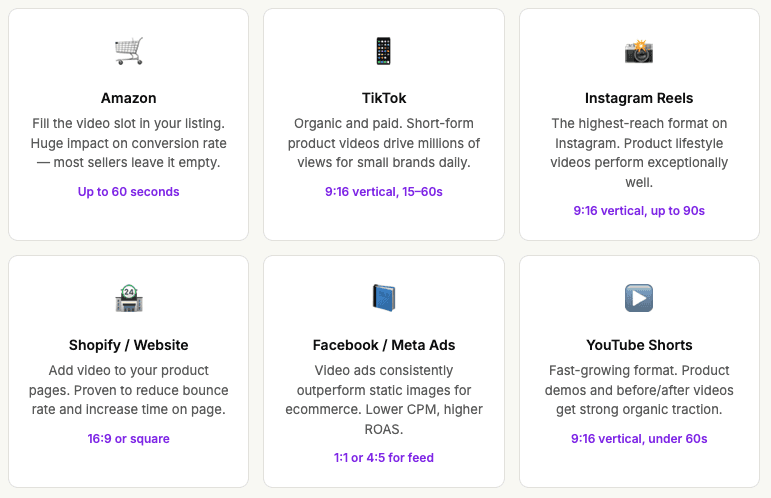
Caspa AI supports the main formats needed for ecommerce: landscape (16:9) for product pages and YouTube, square (1:1) for social feeds, and vertical (9:16) for TikTok, Reels, and Shorts. This means you can create once and deploy across all platforms without reshooting.
What if the AI video doesn't look right for my product?
Caspa AI offers hands-on support — if you're struggling to get the right results, the team will work directly with you and can create videos on your behalf. They also offer a 30-day money-back guarantee if the platform genuinely doesn't work for your product type.
Can I create AI product videos for any type of product?
Caspa AI works across all product categories including jewellery, clothing and fashion, food and beverage, homeware, electronics, skincare and beauty, furniture, and more. The AI is trained on commercial product imagery across all these categories.
AI Education for All is a nonprofit dedicated to making AI technology accessible to everyone.
Ai Education For All
© 2026