If you're selling on Amazon, your product photos are the single most important factor in whether someone clicks on your listing or scrolls past it. Amazon allows up to nine images per listing and most sellers are leaving money on the table by only using one or two basic shots.
The problem? Traditional product photography is expensive, slow, and inflexible. A professional shoot costs anywhere from $200 to $2000+, takes days to organise, and gives you a fixed set of images. Every time you want new angles, seasonal shots, or lifestyle images for a new ad campaign, you're back to square one.
AI product photography changes this completely. In 2026, Amazon sellers are generating full sets of professional listing images in minutes - at a fraction of the cost. This guide walks you through exactly how to do it.

In This Guide
Amazon's Image Requirements in 2026
Before creating any images, you need to understand Amazon's rules. Get these wrong and your listing could be suppressed, meaning it won't appear in search results no matter how good your photos look.
📋 Amazon Image Requirements - Must Follow
Main image: Pure white background (RGB 255, 255, 255), product fills at least 85% of the frame, no watermarks, text, or graphics
Minimum size: 1000 x 1000 pixels to enable zoom (1600px or larger recommended)
File format: JPEG, PNG, GIF, or TIFF — JPEG preferred
Additional images (slots 2–9): Can show lifestyle scenes, different angles, infographics, scale shots, and packaging
No explicit content, offensive material, or placeholder images
Images must accurately represent the product — no misleading shots
The good news: AI tools like Caspa AI are designed with these requirements in mind. You can generate a clean white background main image and a full set of lifestyle and infographic images all in the same platform.
The 5 Types of Images Every Amazon Listing Needs
Top-performing Amazon listings don't just have one good photo - they use all nine slots strategically. Here are the five types of images that consistently drive the highest conversion rates:
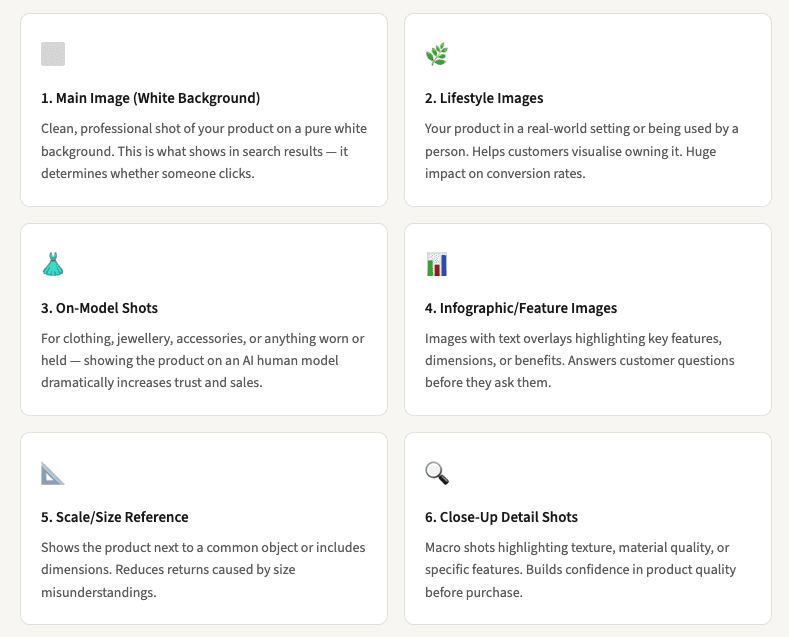
Amazon allows up to 9 images per listing. Sellers who use all 9 slots with varied image types consistently outperform those using fewer images.
Step-by-Step: Creating Amazon Photos with AI
Here's exactly how to create a full set of Amazon listing photos using Caspa AI — the tool used by hundreds of Amazon sellers to generate professional listing images without a studio or photographer.
1. Take a Simple Photo of Your Product
You don't need professional equipment. A photo taken on your phone in good natural light is enough as a starting point. Place your product on a plain surface and take a clear, straight-on shot. Caspa AI will handle the rest.
💡 Tip: The better your starting photo, the better the AI output. Good lighting and a steady hand make a real difference.
2. Upload Your Product to Caspa AI
Go to Caspa AI and upload your product photo. The platform is designed for non-technical users, no design skills or prompting experience needed. You'll be up and running in minutes.
3. Generate Your Main Image (White Background)
Use Caspa's background removal tool to create a clean white background shot that meets Amazon's main image requirements. The AI removes your background and replaces it with a pure white, pixel-perfect and Amazon-compliant.
💡 Tip: Export at 2000 x 2000px or larger to enable Amazon's zoom feature, which significantly increases conversions.
4. Create Lifestyle & Scene Images
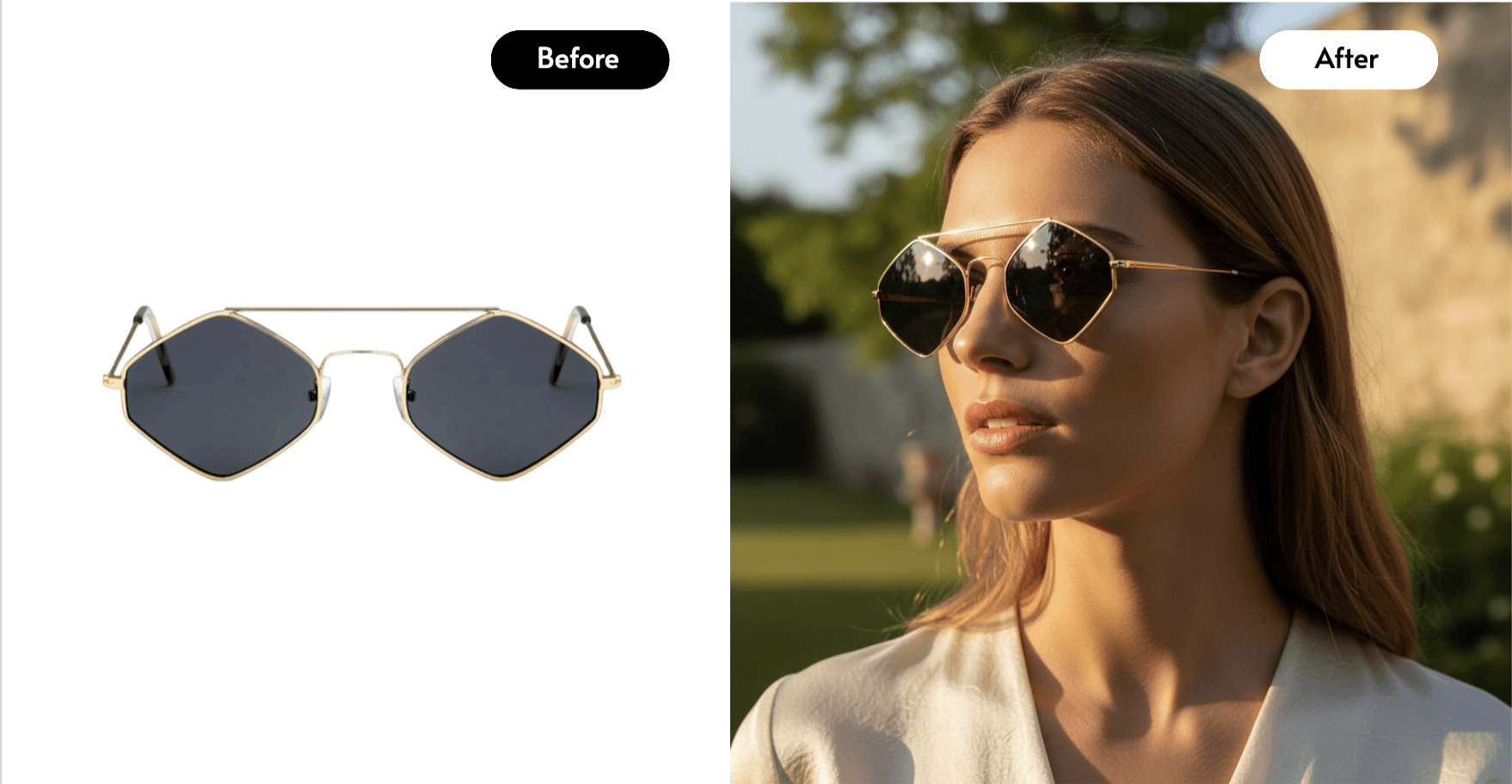
This is where AI transforms your listing. Tell Caspa what kind of scene you want, a kitchen counter, a living room shelf, an outdoor setting, a model holding the product — and it generates photorealistic lifestyle images with your actual product placed naturally in the scene.
💡 Tip: Think about who your buyer is and what their life looks like. Create scenes they'll recognise and aspire to.
5. Add AI Human Models (if relevant)
If you're selling clothing, jewellery, accessories, skincare, or anything that benefits from being shown on a person, Caspa can generate AI human models wearing or holding your product. This is one of the most powerful conversion tools available to Amazon sellers in 2026.
6. Create Infographic Images
Use Caspa's editing tools to add text overlays, callouts, and feature highlights to your images. These infographic-style shots are crucial for answering customer questions directly in the image, reducing hesitation and increasing add-to-cart rates.
7. Download and Upload to Your Listing
Download your final images at full resolution, all commercially licensed and ready to use. Upload them to Seller Central, starting with the white background main image, followed by your lifestyle shots, on-model images, and infographics.
💡 Tip: Put your strongest lifestyle or on-model image in slot 2, it's the first thing buyers see after they click through to your listing.
Try It With Your Own Product
Caspa AI is used by hundreds of Amazon sellers to create professional listing photos in minutes. Money-back guarantee if it doesn't work for your products.
Create Your Amazon Photos with Caspa →
Cost Comparison: AI vs Traditional Photography
Here's what the numbers look like for a typical Amazon seller needing a full set of listing images:
What You Need | Traditional Photography | Caspa AI |
|---|---|---|
White background main image | Included in shoot | ✓ Included |
3 lifestyle images | $150–$300 extra | ✓ Included |
On-model shots (2 images) | $200–$500 (model fees) | ✓ Included |
Infographic design | $50–$150 (designer) | ✓ Included |
Studio hire | $100–$300/day | ✗ Not needed |
Photographer | $200–$600/day | ✗ Not needed |
Turnaround time | 3–10 days | Under 30mins |
New images for a campaign | Full reshoot cost | Minutes, included |
Estimated total cost | $500–$2,000+ per product | From $39/month |
Caspa AI has completely revolutionised how we handle our Amazon product photography. The results are beyond impressive, and the AI tools are so easy to use. We've seen a 30% increase in conversions thanks to their infographics and A+ content generation.
— Michael, Amazon seller
Pro Tips for Higher Amazon Conversions
1. Lead with your strongest image in slot 2
Your main image gets buyers to click. Your second image, the first thing they see on your listing page — is what gets them to stay. Use your best lifestyle or on-model shot here.
2. Show the product in use, not just sitting there
Lifestyle images that show your product being used outperform plain studio shots for almost every product category. A customer seeing someone using your product naturally imagines themselves doing the same.
3. Use infographic images to answer the top 3 questions
Look at your competitor reviews and Q&A sections. What do customers ask most before buying? Turn those answers into infographic images. This alone can dramatically reduce your return rate.
4. Optimise for mobile
Over 60% of Amazon browsing happens on mobile. Make sure text in your infographic images is large enough to read on a small screen, and that your main image is visually striking at thumbnail size.
5. Test your main image
Amazon's Manage Your Experiments tool lets you A/B test your main image. This is one of the highest-impact tests you can run, a better main image directly increases click-through rate from search results.
Your Amazon Image Checklist
Main image: white background, product fills 85%+ of frame, 2000px minimum
At least 2 lifestyle images showing product in use
On-model shots if product is worn or held
At least 1 infographic image with key features highlighted
Scale/size reference image included
All 9 image slots filled
All images exported at high resolution (2000px+)
Commercial usage rights confirmed (Caspa AI includes these)
Frequently Asked Questions
Do AI-generated Amazon listing photos comply with Amazon's policies?
Yes, provided the images accurately represent your actual product. Amazon's rules are about accuracy and quality, not how the image was created. Thousands of sellers are already using AI-generated photos on Amazon successfully. The key is that the product shown must match what the customer receives.
Do I need any design or technical skills to use Caspa AI?
No. Caspa AI is specifically built for non-technical users, small business owners, solo founders, and Amazon sellers who don't have a design background. The interface is straightforward and the Caspa team provides hands-on support if you need help getting results.
Can I use Caspa AI images commercially on Amazon?
Yes. All images created on Caspa AI come with full commercial usage rights. You can use them on Amazon, your own website, social media, paid ads, and any other commercial purposes.
What if the AI images don't work well for my specific product?
Caspa AI offers a money-back guarantee if the tool genuinely doesn't work for your product type. They also offer hands-on support - the team will work directly with you to get the right results, and will even create images for you if you're struggling. No other AI photography tool offers this level of support.
How many images can I create per month?
This depends on your Caspa AI plan. Most sellers find a monthly subscription gives them far more than enough credits to cover all their listings and ongoing campaigns. Check Caspa's current pricing here.
Can I create Amazon infographic images with Caspa AI?
Yes. Caspa includes tools for creating infographic-style product images with text overlays, feature callouts, and branded elements, all within the same platform. No need for a separate Photoshop or Canva workflow.
AI Education for All is a nonprofit dedicated to making AI technology accessible to everyone.
Ai Education For All
© 2026